Exporting as files
Save a reply or a document artifact as a Word document, PDF, presentation or spreadsheet.
You can save a reply, or a document artifact, as a Word document, a PDF, a presentation or a spreadsheet. OCI makes the file from the saved text, so it matches what the reply says, laid out for that format.
How to export
- A reply: below it, select Export as… (the file icon next to Copy) and choose a format. On a computer the reply's buttons appear when you point at it; on a phone they are always shown.
- A document artifact: open it and select Export as… in the panel. You get the version you are looking at. Pages, images and diagrams are not converted: use Download.
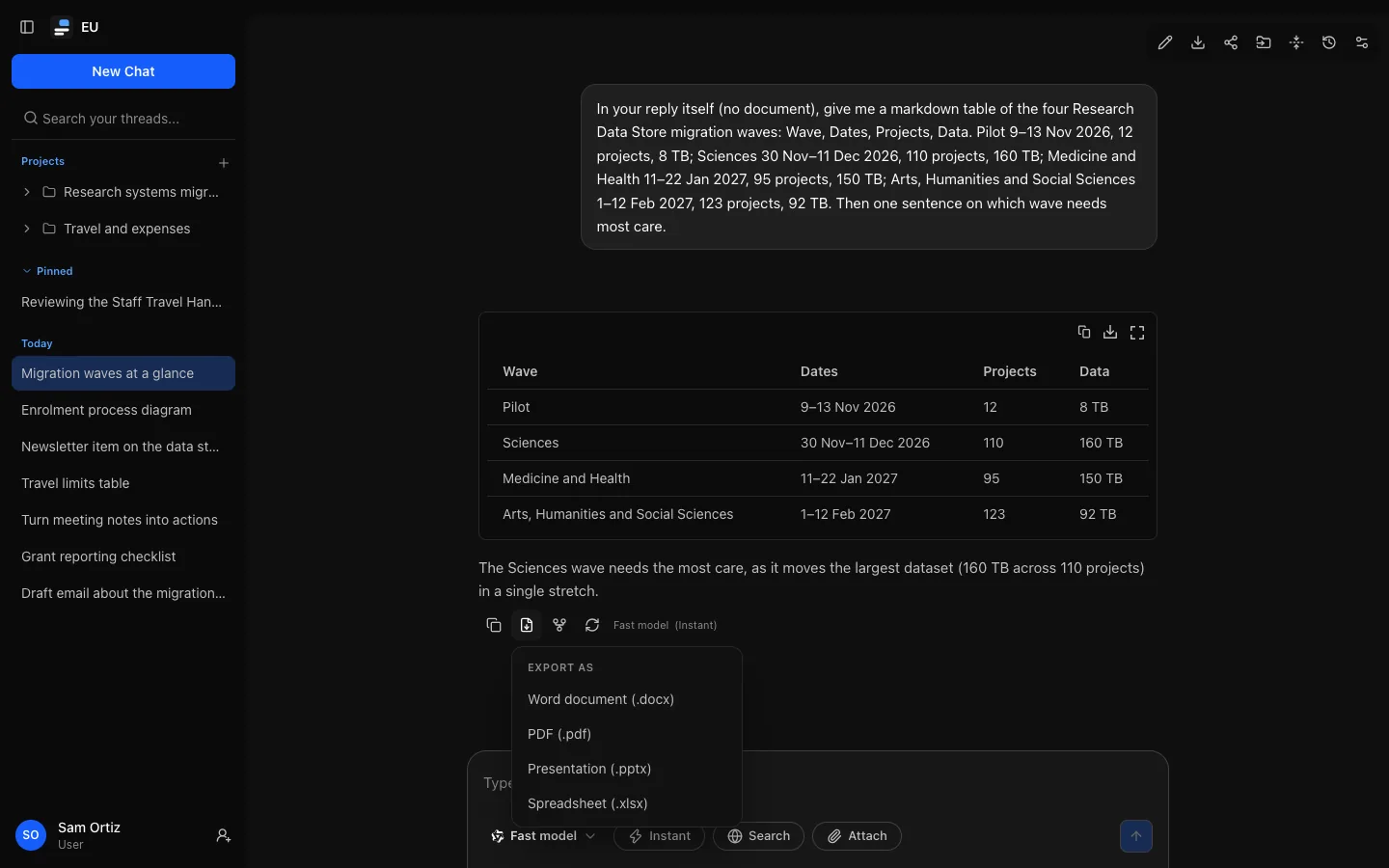
The menu works with the keyboard: arrow keys move between formats, Enter chooses one, Escape closes it. The file downloads as soon as it is ready, usually within seconds; if it cannot be made, the reason appears under the button. Export is not offered while a reply is being written, for replies with no text, or on share links.
Formats
| Format | What you get |
|---|---|
Word document (.docx) | The title, then the content with real headings, bulleted and numbered lists, tables with a shaded header row that repeats on each page, and code in a monospace font. A4 pages. |
PDF (.pdf) | The same content on A4 pages. Text in any common script, including right to left; see Characters in PDFs. |
Presentation (.pptx) | A widescreen deck: a title slide, then one slide per top-level heading (or per second-level heading when there is only one top-level heading). Paragraphs and list items become bullets; tables become slide tables; a slide that would overflow continues on the next, marked "(continued)". |
Spreadsheet (.xlsx) | One worksheet per table, named after the heading above it or "Table 1", "Table 2". The header row is bold and frozen. Plain numbers and percentages are stored as numbers; everything else, including 007 or =SUM(A1), stays text. Offered only when there is a table. |
Files are named after the conversation and the day for a reply (quarterly-plan-reply-2026-10-02.docx), and after the title and version for a document (project-plan-v3.pdf).
What is kept, and what is not
Kept: headings, paragraphs, bold, italic, strikethrough and inline code; lists (nested, and their starting number); tables with their column alignment; code blocks without colours; block quotes and horizontal rules (except in presentations); links to http, https and mailto addresses.
Not kept:
- Images are never downloaded into the file; each shows as its description, such as "[Image: Sales by region]".
- Maths stays as written, such as
$x^2$. - Diagrams and HTML in a reply appear as their source. Open the artifact to download the drawing or page.
- Web sources, reasoning and tool steps, which are not part of the reply's text. To keep the whole conversation, download it as Markdown from the top of the conversation, or use Your data.
Characters in PDFs
A reply or document in Western European languages only is set in Helvetica and Courier, the standard PDF fonts. One with other text includes the fonts it needs instead, with only the characters used, so the file stays small:
- Latin with any accents, Vietnamese, Greek, Cyrillic and Devanagari in Noto Sans;
- Chinese, Japanese and Korean in Noto Sans SC, JP and KR. A document with Japanese kana uses the Japanese forms of shared characters, one with Korean Hangul the Korean forms, and otherwise the Chinese (simplified) forms;
- Arabic, with its letters joined as they should be, and Hebrew, in Noto Sans Arabic and Hebrew. Right-to-left paragraphs start on the right and read right to left, with numbers and Latin words inside them kept left to right;
- arrows, maths symbols and similar signs.
Some limits:
- Emoji print as "�": colour emoji fonts cannot be embedded this way.
- Chinese, Japanese, Korean, Arabic and Hebrew have no italic, and Chinese, Japanese and Korean bold is drawn slightly thicker rather than in a bold font.
- A few rare characters no bundled font has also print as "�". Word documents keep every character, for your own fonts to show.
- List bullets and numbers stay on the left, also in right-to-left lists.
Limits
- The text can be up to 512 KB, and the file up to 20 MB. A presentation has at most 250 slides, and a table cell on a slide shows at most 500 characters.
- Very long or complex content can take too long to lay out; OCI says so, and a shorter part or another format usually works.
- File exports and single-conversation Markdown downloads share an allowance of 60 an hour.
- One file is prepared at a time for you. When many people export at once, you may be asked to try again in a moment.
Every export is recorded in the audit log with its format and size, never its content.