Tools and connectors
Tool steps in a reply, approving tools that change something, and connecting your own accounts to services models can use.
Some models can use tools while they write a reply: look something up, read the result, and decide what to do next. A reply that uses tools may take several steps before you see the answer.
When a model uses tools
Three things decide it:
- The model. Only models marked Tool calling in the picker use tools. Other models answer as usual.
- Your role. Your institution decides which tools each role may use.
- The tool's own switch. Web search, for example, is offered only when Search is on for the message.
Tools can also come from connectors: services your institution has connected, such as a document store, a wiki or a ticketing system. Some need you to connect your own account first (below).
What a tool step looks like
A reply's tool calls, with any reasoning around them, are gathered into one collapsed block at the top of the reply, summarised in a few words, such as Searched the web twice or Thought · used Get ticket status (see How a reply shows the model's work). While the model works, the block's heading says what it is doing now, for example Searching the web…. Expand the block to see each call as a short line, for example:
Searched the web for 'library opening hours' · 5 results
Select the line to see what the model asked the tool for and a summary of what came back. Sources a tool found, such as web pages or documents a connector linked to, are listed under Searched the web above the block, and in Search Grounding Details below the answer.
A reply can use tools for a set number of steps (8 unless your institution changed it). If it reaches that limit, the model answers with what it has found and a note says so. If your usage allowance runs out part-way, the reply stops and says so below the block. Ask a narrower question, or continue in a new message.
Approvals
Tools that only look something up run without asking. Tools that change something elsewhere (sending a message, creating a record, updating a ticket) always ask you first. The reply pauses on a card below the work block, never hidden inside it, with the tool, its connector, and the exact inputs it will run with.
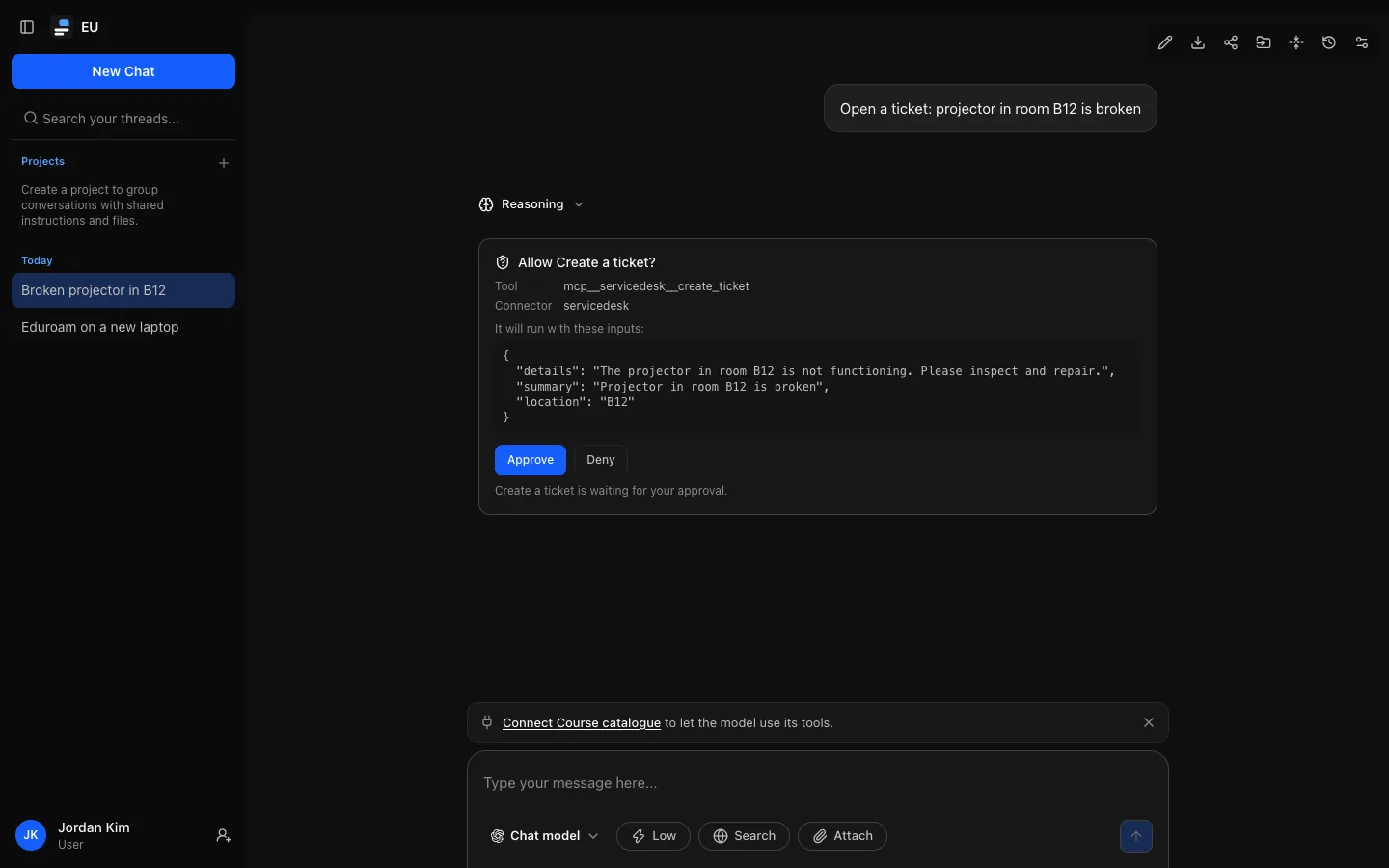
Choose Approve to let it run or Deny to refuse. Either way the model carries on with the same reply; after a denial it is told you said no and answers without the tool. An approval waits as long as you like, including across a reload or on another device. If you send a new message instead, every unanswered approval in the conversation is refused as "not answered" and the tool does not run.
Connecting your account
Some connectors use your own sign-in, so the service shows you only what your account may see. Settings → Connectors lists the ones you can connect: those whose tools your role may use and that need your own sign-in. Connectors that need nothing from you are not listed.
Select Connect next to the service.
Sign in to the service and approve access for Open Chat Interface.
You come back to Settings → Connectors, which shows the service as Connected.
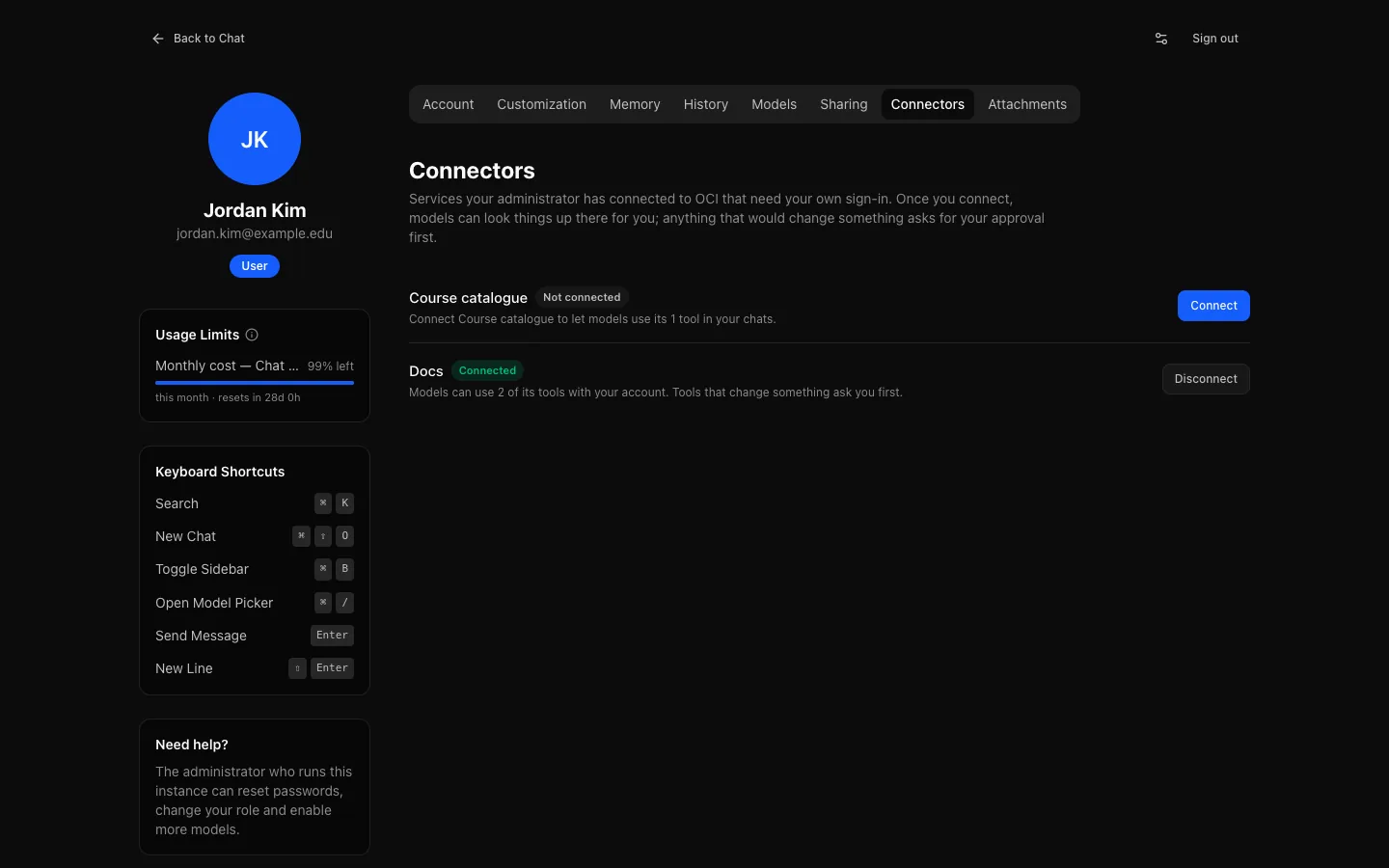
From then on, tool-capable models can use the service's tools in your conversations, with your account. Until you connect, those tools are not offered at all.
While a tool-capable model is selected, a note above the message box may remind you of a service you have not connected ("Connect Docs to let the model use its tools"). The × dismisses it for that service, in this browser only.
If a connection expires or the service refuses it, Settings shows Connection expired and Reconnect.
Disconnect deletes your tokens and, where the service supports it, asks the service to revoke them. Models stop using the service for you at once; existing conversations keep the steps they already show.
Privacy
- Tool inputs and results are stored in the conversation and follow its retention.
- Share links show the same collapsed block, summarising the tool steps; expanded, it lists each step's one-line summary. Exports list each tool step as its one-line summary. The raw results a tool returned are left out of both.
- Your institution's audit log records that a tool was called, whether it was approved and how it ended, and that you connected or disconnected a service, but never the inputs or results.
- Your connector tokens are stored encrypted and are only ever sent to that service.