Branding
The instance name, logo, accent colour, default theme and sign-in message, and everywhere they appear.
Appearance & features → Branding (/admin/branding). The instance name, a short name, a logo, the appearance, and a message on the sign-in page.
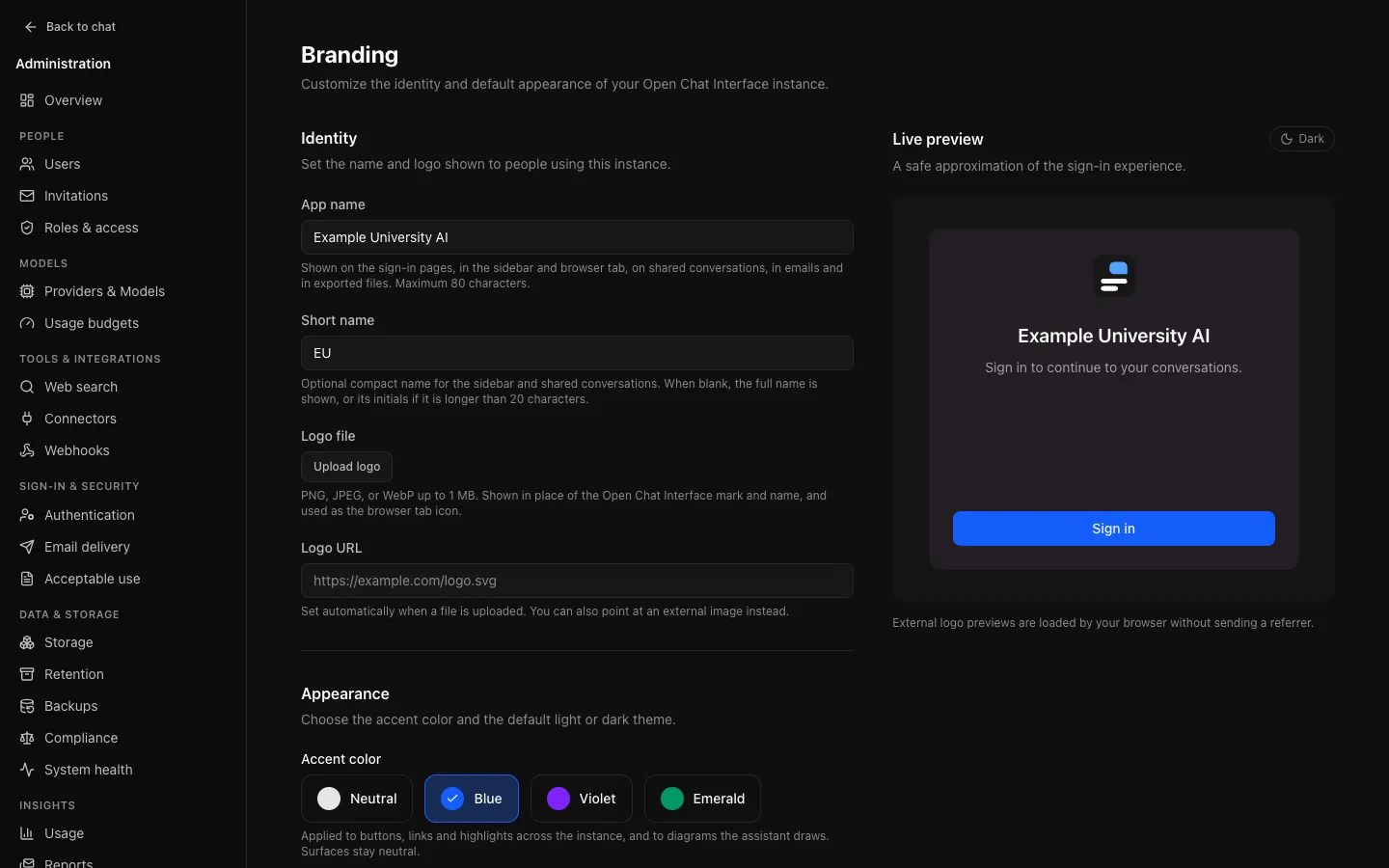
Name and logo
- App name (up to 80 characters) is shown on the sign-in page, in the app's navigation, in browser tab titles, on share pages and in emails (below).
- Short name is used in the narrow sidebar; when blank, a name longer than 20 characters collapses to its initials.
- Logo file or Logo URL. A Live preview beside the form shows the sign-in page as it will look.
Upload the logo rather than linking it. The logo URL field accepts an external http(s) address, but a linked image disappears if its host does, on the one page people see before they can sign in. Uploading stores it with the instance and fills in the field.
SVG uploads are refused: the logo renders before sign-in, and SVG can carry script. PNG, JPEG and WebP are accepted, checked by content rather than extension, up to 1 MB.
Without a logo, headers show the Open Chat Interface mark beside the app name. With a logo, the logo replaces both the mark and the name.
Appearance
- Accent color: neutral (the default), blue, violet or emerald, applied to buttons, links and highlights across the instance, including the sign-in and share pages. Surfaces stay neutral, so no choice here can make text unreadable.
- Default theme: light, dark or system, for anybody who has not chosen a theme themselves. People who chose one keep it.
What follows branding
| Surface | Name | Logo | Colours |
|---|---|---|---|
| Sign-in, sign-up, invitation and password-reset pages | Yes | Yes | Yes |
| Sidebar and the phone menu | Yes (or the short name) | Yes | Yes |
| Browser tab | Title: page · name, such as Sign in · Example University Chat; a shared conversation shows its title | Tab icon, from an uploaded logo | |
| Shared conversation pages | Header | Header | Yes |
| Verification, password-reset and invitation emails | Subject, body and the sender's display name | ||
| Scheduled usage reports | Subject and body | ||
| Diagrams the assistant draws | Accent (below) | ||
| Markdown download of a conversation | Exported from Example University Chat on … | ||
| Word, PDF, PowerPoint and Excel files | Author or creator |
Diagram accent. Diagrams are drawn on light paper, so each colour theme uses its light-mode accent. Neutral has no hue, so it keeps the diagram style's default orange.
Tab icon. An uploaded logo becomes the tab icon (and the home-screen icon on iOS), scaled by the browser, so a square logo works best. A logo linked from another site keeps the Open Chat Interface icon, so browsers never fetch a third-party image for every tab.
What does not follow branding:
- The page served before the app starts, for the moment it takes to load, and so link previews: chat apps and search engines read that page without running the app, so a shared link's preview says Open Chat Interface.
- The Open Chat Interface mark itself, which is never recoloured.
- The README in a person's data export, which names the software and version that wrote it, since an import needs that.
- The client name OCI registers with a connector's sign-in server, which may show Open Chat Interface on its consent page.