First run
From a fresh install to opening the doors, following the setup checklist on Overview.
What to do between installing an instance and letting anybody in. The steps follow the setup checklist on Overview, which lists them in the order things depend on each other.
Sign in as the first administrator
The API creates one administrator the first time it starts against an empty database, from INITIAL_ADMIN_EMAIL and INITIAL_ADMIN_PASSWORD. If the password variable is unset or empty, it prints a one-time password to its log instead: docker compose logs api.
Change that password at once under Settings → Account if it came from an environment file. Keep the account: it is your way back in if single sign-on breaks (Break-glass access).
Reading the checklist
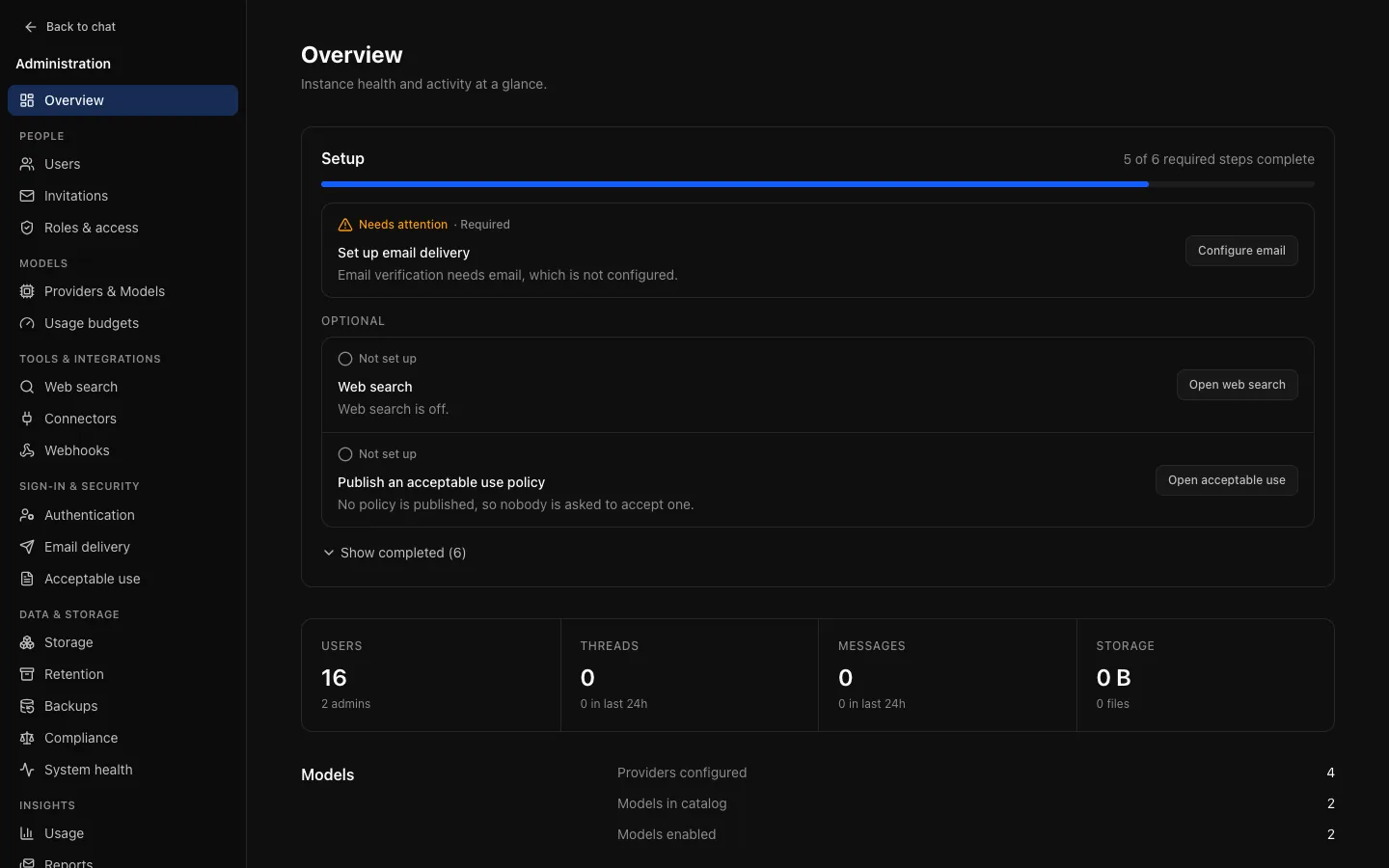
The server works the checklist out from stored configuration, so an item is complete when the setting is in place, not when you have visited a page. Nothing in it contacts an external service: a provider key or SMTP server that is saved but rejected shows on System health, not here.
Each item is Needs attention (missing or broken; Required items count towards the progress bar), Not set up (optional and off) or Complete (hidden behind Show completed). Once every required item is complete the panel collapses to Setup complete, but anything optional that is on and broken still shows. Every item links to the page that resolves it. Auditors see the same list.
Connect a model provider
Models → Providers & Models → Providers. Complete when at least one provider is enabled, valid and has its credential (an OpenAI-compatible server may need none). See Providers and models.
Enable at least one model
The Models tab. Use Discover models on a provider, then add the models you want. Adding a provider exposes nothing: you choose which models appear, and to which roles.
Choose a default model
Above the catalogue. Complete only when exactly one model is the default, it is usable, and it is visible to the user role: a default ordinary users cannot see is not a default for them.
Offer a way to sign in
Sign-in & security → Authentication. Complete when local sign-in is on or a single sign-on provider is enabled. While there, check Registration mode, which defaults to invite only:
- Open: anybody who can reach the sign-up page gets an account. Only for an instance that is not publicly reachable.
- Invite only: an account needs an invitation link.
- Closed: no new accounts through the form, which is what you want once an identity provider does the work.
Connecting an identity provider? Read Identity and sign-in first, especially Require a matching role.
Set up email delivery
Sign-in & security → Email delivery. Optional until something needs it: it becomes required when email verification is required or a scheduled report is on. Without SMTP, invitation links have to be shared by hand. See Email delivery.
Configure file storage
Data & storage → Storage. The local filesystem always counts as complete; back up its volume. S3-compatible storage needs attention until its settings are complete. More than one API replica needs S3. See Storage.
Web search (optional)
Tools & integrations → Web search. Off is a valid choice. Once on, it needs a provider and its key or address. See Web search.
Publish an acceptable use policy (optional)
Sign-in & security → Acceptable use. If people must agree to terms, publish them before opening the instance. See Acceptable use.
Connect Redis for several replicas (optional)
Set with REDIS_URL in the environment. Without it, rate limits and reply recovery work per replica only. The checklist reports whether it is configured; System health reports whether it answers.
Before opening the doors
The checklist does not cover limits, because there is no wrong answer to detect. Decide them anyway: limits applied after people start working feel like a punishment.
- A usage budget per role, on Models → Usage budgets (Budgets and limits).
- Rate limits and a storage allowance per role, and which features and tools each role gets, on People → Roles & access (Roles and access).
- A retention period, on Data & storage → Retention, easier to introduce now than later (Retention).
- Backups, on Data & storage → Backups, unless you back up PostgreSQL another way (Backups).
Then open System health. A green page there is a better sign you are ready than a completed checklist.