Compliance export and legal hold
Audit events and, optionally, conversation content exported as verified JSON Lines to S3, exactly once; and legal holds that pause deletion for named people.
Data & storage → Compliance (/admin/compliance). Two tools for eDiscovery, records requests and security monitoring:
- Compliance export: every audit event (including what was deleted, by whom and when) and, if you turn it on, conversation content, written as JSON Lines to S3-compatible storage every hour or every day. Each run continues exactly where the last one ended.
- Legal hold: named people whose records no retention job, purge or deletion may remove until the hold is lifted.
An auditor sees everything here and changes nothing.
The export
| Stream | When | Each line |
|---|---|---|
| Audit events | Always, while the export is on | One audit entry: seq, id, createdAt, action, actorUserId, actorEmail, targetType, targetId, metadata, ipAddress. Includes deletion events. |
| Conversation content | Only with Include conversation content on | One message: seq, id, threadId, userId, userEmail, role, status, model, parentMessageId, createdAt, updatedAt, supersededAt, error, thread (title, temporary, projectId), text, toolSteps, files, sources. |
The first export includes the whole audit log as retention has kept it. For messages:
textis what people read; reasoning is not exported.toolStepshas one line per tool call, such as Searched the web for "opening hours" · 5 results; raw tool results are not exported.filesnames attachments (attachmentId,filename,mediaType). Attachment contents are never exported.- A message is exported when created and again whenever its text, tool steps, status or error change, or a retry replaces it (
supersededAt). A reply still being written is exported once, when it finishes. - Temporary chats are included, marked
"temporary": true. - Deletions are not exported as messages. Deleting a conversation or an account leaves the lines already exported; the deletion itself is a deletion event in the audit stream.
Content is off by default
Include conversation content copies everyone's messages to the destination, where OCI's retention, deletion and access controls no longer apply. The page warns before you save it. Turn it on only where your policy requires it, and say so in your acceptable use policy. Content is exported from the moment you save the setting; earlier messages, and messages written while it was off, are never exported.
Deletion events
Everything that moves a person's data to the trash, restores it or deletes it writes one audit entry, whether the person did it, an administrator, or a background job (retention, trash purging, temporary-chat expiry, memory retention). So a downstream archive can tell a deletion from a gap. Each entry is written in the same database transaction as the change: a deletion is never committed without its entry, and no entry is written for a deletion that rolled back. They travel in the audit stream, so they are exported exactly once like every other audit event, can be sent to webhooks, and are kept by audit retention while unexported or while their owner is on legal hold.
action | When |
|---|---|
conversation.trash | A conversation moves to the trash, by its owner or by conversation retention. Counts the files that went with it. |
conversation.restore | Its owner restores it from the trash. |
conversation.delete | A conversation is destroyed: deleted forever or the trash emptied, the trash window elapsed, or a temporary chat expired. Counts the messages, files and artifacts destroyed with it. |
attachment.trash | A chat file is deleted on its own (it goes to the trash). |
attachment.delete | A project file is deleted, or a chat file in the trash is purged. |
project.delete | A project is deleted, with its files; its conversations are kept. |
memory.delete | A memory note is deleted by the person, by a model's forget tool or Undo, or by memory retention. One entry per note. |
user.delete | An administrator deletes an account, or a person deletes their own (self: true). Counts everything deleted with it. |
Every one has the same metadata.deletion object:
| Field | Meaning |
|---|---|
type | conversation, attachment, project, memory or user. |
id | The ID of what was trashed, restored or deleted. |
ownerUserId, ownerEmail | Whose data it was; kept after the account is deleted. |
reason | user, admin, tool, retention, trash_expiry, temporary_expiry or unused_expiry (a conversation started and never used). |
permanent | true for *.delete; false for trash and restore. |
Who is actorUserId and actorEmail: the owner, the administrator, or null for a background job (the reason names the job). When is createdAt. Never what was deleted: no conversation titles, file names, project names or memory text, because audit entries are shown to administrators, sent to webhooks and kept after the thing itself is gone. With Include conversation content on, the archive already holds the messages, keyed by threadId, so the IDs join a deletion to what it removed.
Objects
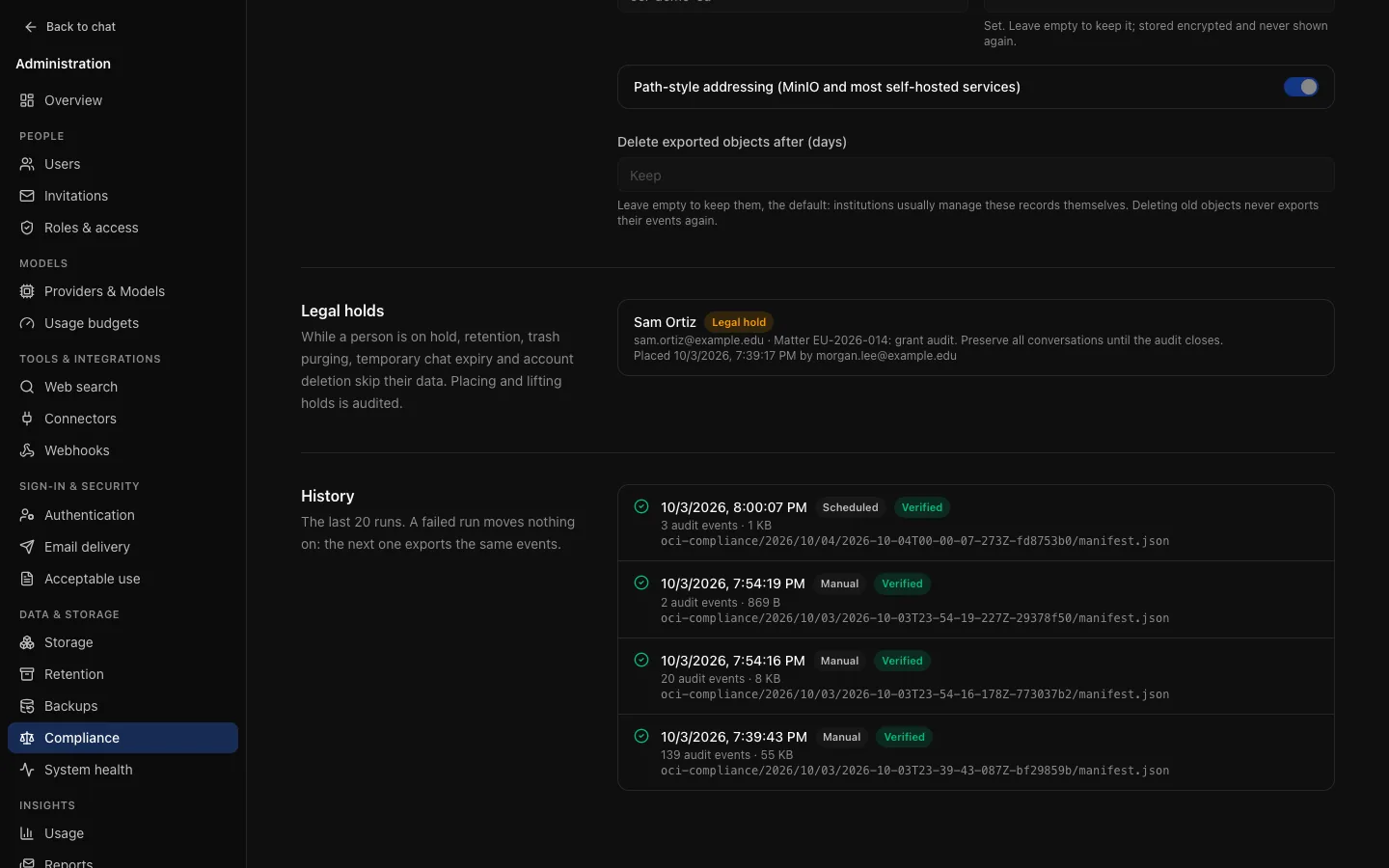
Each run that has something to export writes one folder; a run with nothing new writes none and shows as Nothing new to export.
<prefix> is .oci-compliance/ in the attachment bucket, or your own prefix in a separate bucket. manifest.json names the format (oci-compliance/1), the OCI version, the run, whether content was included, and for each stream its object key, afterSeq, throughSeq, count, first and last sequence numbers, size and SHA-256. Only folders with a manifest.json are complete.
Exactly once
Every audit event, and every message change, appears in exactly one object:
- Each stream has a cursor. A run writes everything between the cursor and a safe upper bound, reads every object back to check its size, SHA-256 and line count, writes and checks the manifest, and only then moves the cursor, in the same transaction that marks the run succeeded.
- A failed run moves nothing on. Its objects are deleted and the next run writes the same events again. A run interrupted by a restart is marked failed by the next one, which deletes what it wrote.
- Transactions still in progress cannot be skipped: the upper bound is read under a brief lock that waits for writers already under way. If the table stays busy, the run fails with stayed busy and the next run retries; nothing is skipped.
- Sequence numbers can skip (a rolled-back transaction uses one and writes nothing), so check continuity by each manifest's
afterSeqequalling the previous one'sthroughSeq, per stream.seqwith the stream is a unique key to deduplicate on.
sha256sum audit.jsonl              # equals streams.audit.sha256
wc -l < audit.jsonl                # equals streams.audit.count
jq -s 'map(.seq) | (. == sort)' audit.jsonl
Destination and schedule
- Destination: the attachment bucket under
.oci-compliance/(storage reconciliation never treats these as orphans), or a separate S3 bucket (recommended) with its own region, endpoint, access key and prefix. Records meant to be tamper-evident belong in a bucket with versioning or object lock. Test destination writes, reads back and deletes a small object. The credential needss3:PutObject,s3:GetObject,s3:DeleteObjectand the multipart upload actions. Turning the export on is refused while the destination is incomplete. - Schedule: every hour, or once a day at an hour (UTC). A check every five minutes runs an export when the current period has none yet; a failed scheduled run is retried after an hour. Export now runs one in the background.
- Retention of exported objects: kept by default. Delete exported objects after (days) removes older successful runs' objects at the current destination.
Changing settings is audited as compliance.settings.update and kept regardless of retention. Manual runs and every failed run are audited as compliance.export.run, so a webhook can alert on failures. System health has a Compliance export row: a failed latest run is an error; no success for two periods is a warning.
Legal hold
Under Legal holds, enter a person's email and a reason (a matter or case reference) and choose Place hold. Lift ends it, with an optional reason. Both are audited (compliance.hold.place, compliance.hold.lift) and kept regardless of retention; lifted holds stay listed as history. Held people are marked Legal hold in the user list and on their account page.
| Normally | Under hold |
|---|---|
| Conversation retention moves inactive conversations to the trash | Skipped for this person |
| The trash is purged after its window | Their trash (conversations and files) is kept |
| Expired temporary chats are deleted | Kept (still invisible to them) |
| Audit retention prunes old entries | Entries by or about them are kept, including deletion events for their data |
| Memory retention deletes old notes | Their notes are kept |
| Usage history is pruned after its window | Their usage events are kept (daily totals are always kept) |
| Expired and revoked share links are removed after 30 days | Their links are kept (still unusable) |
| They empty their trash or delete a conversation forever | Refused: Permanent deletion is paused for this account by your organization. Moving to the trash still works. |
| They delete a project or a project file | Refused: projects have no trash, so this would destroy the files at once |
They delete memory notes (in Settings, with the forget tool, or by undoing a saved note) | Refused. Editing a note still works. |
| They delete a chat file | Still works: it goes to the trash, which is kept |
| They or an administrator delete the account | Refused, by the server and by a database trigger on any path |
Lifting the hold restores normal behaviour: anything past its window is removed at the next run. A hold applies to work that starts after it is placed.
Every place OCI deletes data checks holds, and a test in OCI's own suite fails when a new deletion is added without that decision. Deletions that do not check remove things that are not a person's records: sessions and tokens, connector credentials, configuration, queues and similar.
What a hold does not cover
A hold does not stop the person using OCI (ban them for that), does not change what the export includes, and does not cover data outside OCI's database and file storage. Backup retention still deletes old backups. Editing, such as renaming a conversation or changing a project's instructions or a memory note, is not deletion and is not paused.