Connectors
Connect remote MCP servers whose tools models can call, choose how they authenticate, enable tools as read or write, and keep outbound requests safe.
Tools & integrations → Connectors (/admin/connectors). A connector is a remote MCP server that OCI talks to over Streamable HTTP. Once you enable some of its tools and allow them for a role, tool-capable models can call them while they reply: search a document store, look up a ticket, create a page. See Tools and connectors for what people see.
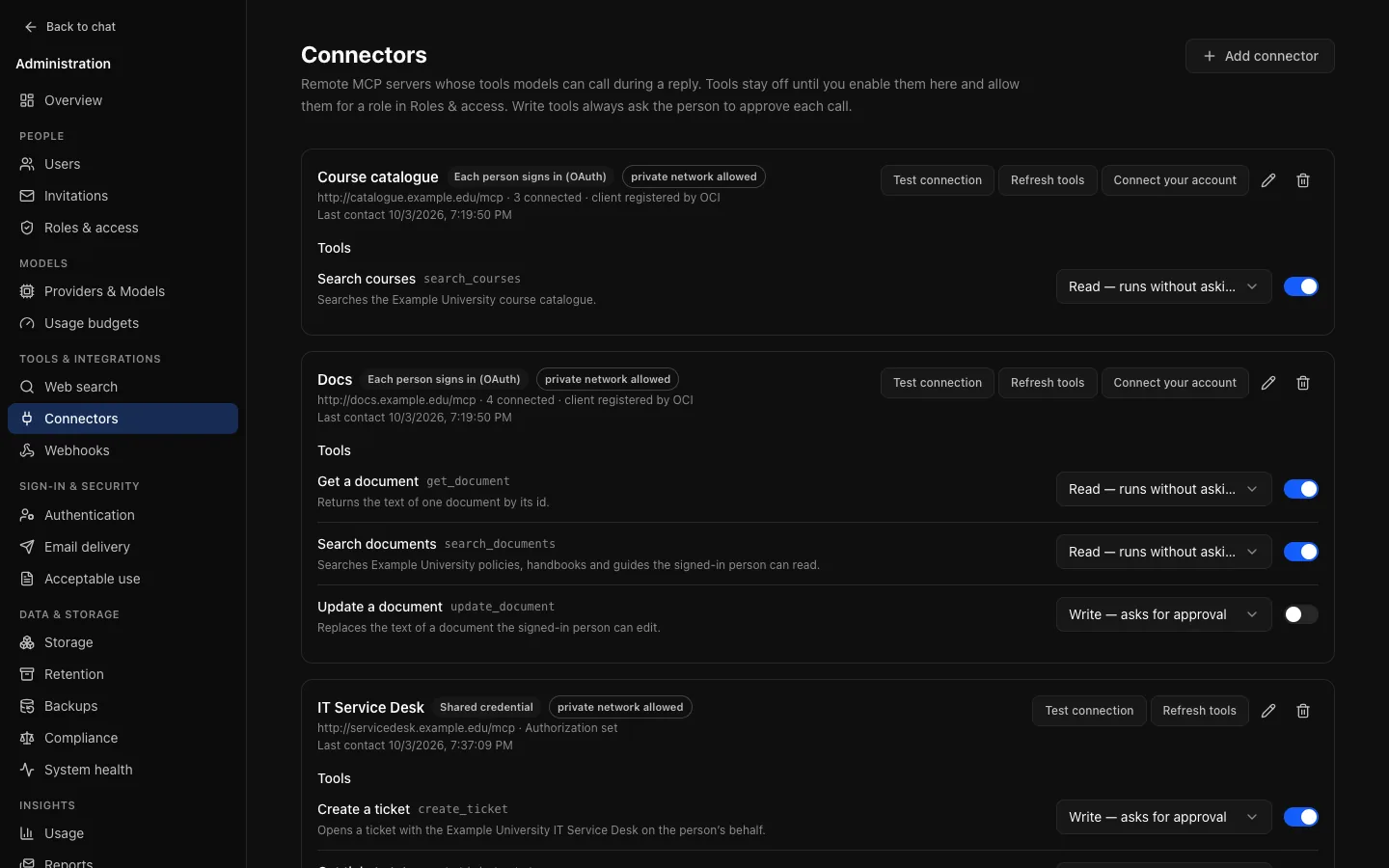
Nothing is offered until, for a tool:
- the connector and the tool are enabled on this page;
- the tool is allowed for the person's role under Roles & access → Tools (connector tools are off for every role until you allow them);
- for an OAuth connector, the person has connected their own account under Settings → Connectors;
and the model has the Tool calling capability.
Adding a connector
Add connector, then:
- Name: shown to people next to the connector's tools.
- Server URL: the MCP endpoint, such as
https://mcp.example.edu/mcp. It must behttps://(see Private networks). OCI does not follow redirects, so enter the final address. - Short name (optional): used in tool IDs,
mcp__<short name>__<tool>. Chosen from the name if left empty, and fixed once saved. - Authentication: below.
Then Refresh tools asks the server for its tools and lists them; Test connection checks the MCP handshake and reports how many tools the server lists.
Authentication
| Mode | How it works | Use when |
|---|---|---|
| No sign-in | OCI sends no credential. | The server is public or protected another way. |
| Shared credential | One header, such as Authorization: Bearer … or X-Api-Key: …, on every request, for everyone. | The server has a service account and everyone may see the same things. |
| Each person signs in (OAuth) | Each person connects their own account; OCI calls the server with that person's token. | The server should apply each person's own permissions. |
Shared credentials, OAuth client secrets and people's tokens are encrypted with ENCRYPTION_KEY. The page shows only whether a secret is set; Replace it and Remove it change it.
OAuth
OCI uses the authorization code flow with PKCE. It discovers the authorization server from the server's OAuth metadata, then either registers itself (dynamic client registration; leave Client ID empty) or uses the Client ID and optional Client secret you enter. In that case, register the Redirect URL shown in the form: APP_URL/api/connectors/oauth/callback. Scopes are optional.
The first time anyone connects, OCI records the authorization server. If the server later names a different one, connecting is refused until you save the connector again: a changed sign-in server is something to check, not follow.
Administrators can Connect your account here before any tool is allowed; Refresh tools and Test connection on an OAuth connector use your own connection. Changing a connector's URL, authentication mode or client ID disconnects everyone connected to it.
Tools: enabling and approval
Refreshed tools arrive disabled. Each has a kind:
- Read: looks something up. Runs without asking.
- Write: changes something elsewhere. The person approves every call.
A tool starts as read only when the server declares it read-only (readOnlyHint); otherwise write. You can make any tool write, so it asks first. Making a tool read that the server does not declare read-only lets it run without asking, so the page asks you to confirm and the audit log records it.
Refresh tools updates descriptions and input schemas, adds new tools (disabled) and marks tools the server no longer lists as no longer listed; those are never offered. Models always see what was stored at your last refresh: a server cannot change what models read without an administrator refreshing.
Results and sources
A tool's result reaches the model as untrusted content, never as an instruction. Text is kept up to 12,000 characters; images and binary content are left out and named. Links the server returns are shown as sources under the reply. The server's own instructions from the MCP handshake are ignored.
Safety
- Addresses. OCI resolves the server's name on every connection and refuses private, loopback, link-local, carrier-grade NAT, multicast and other reserved addresses, IPv4 and IPv6. The check is on the address the connection actually uses, so DNS rebinding cannot reach a private address.
- Cloud metadata addresses (
169.254.169.254,169.254.170.2,100.100.100.200,fd00:ec2::254) are always refused. - Redirects are never followed.
- Limits. Each MCP request has 30 seconds, and a response over 2 MB is refused. The model sees a clear error.
- OAuth endpoints get the same checks.
- Credentials are sent only to the connector's server (tokens only to its recorded authorization server), and never logged, returned or audited.
Private networks
Allow private network permits plain http:// and private, loopback and link-local addresses for one connector. Turn it on only for servers you run on your own network. It is checked on every connection, so turning it off takes effect at once.
Status, deleting and audit
Each connector shows its last successful contact and last failure; System health warns when an enabled connector's latest exchange failed. Deleting a connector removes its tools, everyone's connections and every role's allows; past replies keep their tool steps.
Audit actions: connector.create, connector.update, connector.delete (all kept regardless of retention), connector.tools.refresh, connector.tool.update, connector.account.connect, connector.account.disconnect, and tool.call for every call, never with inputs or results. Auditors see everything here except secrets.
Limits of the current design
- A connection is opened per tool call and closed afterwards.
- Refreshing a person's expiring token is coordinated across API replicas, so servers that rotate refresh tokens do not disconnect people. A replica that waits more than 30 seconds for another's refresh fails that call with "try again later".
- Only Streamable HTTP servers are supported: not the older HTTP+SSE transport or local (stdio) servers.
- The API makes connector requests itself, so allow egress to the servers and their authorization servers where egress is filtered.